Rizo: AI Photo Video Maker
- 4.4
- Rating
- 10.00K
- Installs
- Free
- Price

 Analysis by App-foxy
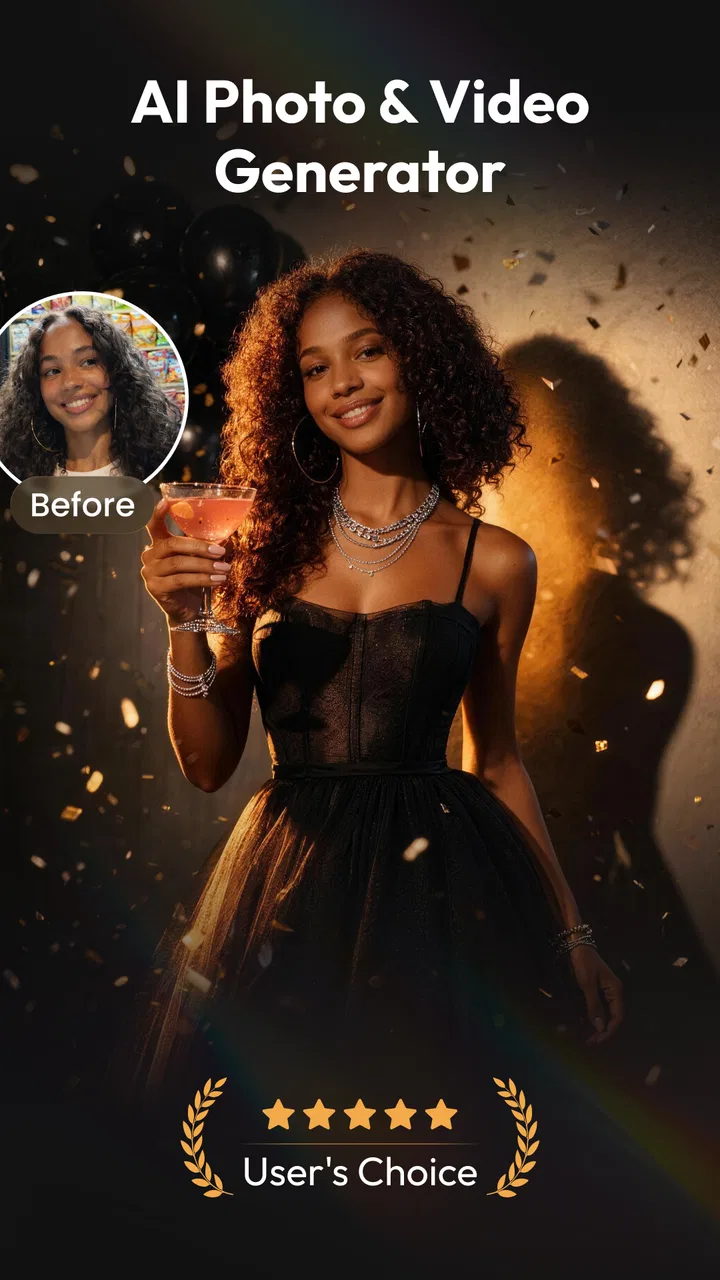
Rizo: AI Photo Video Maker is the kind of app that attracts attention quickly because it turns ordinary personal media into something more expressive. I found its appeal in the short gap between choosing a photo and imagining what that photo could become: a moving portrait, a stylized clip, a dance-inspired creation, or a more polished headshot. It sits in the video players and editors category, but its real identity is closer to an AI-assisted creation studio for people who want results without learning a traditional timeline editor.
My first impression was that Rizo is aimed at reducing the distance between an idea and a shareable result. Instead of beginning with multiple tracks, trimming tools, and layers, I could think in terms of a source image and a desired transformation. That makes it approachable for casual creators, social media users, and anyone who wants to experiment with visual content without spending an evening learning editing terminology.
The important question, though, is not whether the novelty is entertaining during the first week. Many AI media apps are good at producing a few exciting experiments and then become forgotten. Rizo has a better chance of staying installed when it becomes part of a repeatable workflow rather than a one-time toy. In my view, its long-term value depends on how often you actually need quick visual variations, portraits, or photo-based clips.
You May Also Like

 Pandora - Music & Podcasts
Pandora’s Music Is Easy to Start, but Harder to Recover
Pandora’s strength is its low-effort path from a seed to a station. Its weak spot is how much confidence it asks you to place in connection, setup, and quiet recovery.

 AccuWeather: Weather Radar
AccuWeather Review: A Quick, Clear Forecast for Everyday Decisions
For everyday plans, the best forecast is the one you can understand quickly. AccuWeather makes rain timing, radar, and local conditions easy to act on, with a few trade-offs.

 Hill Climb Racing
Why Hill Climb Racing Still Turns Crashes Into One More Run
A tiny car, a bumpy hill and one more upgrade: Hill Climb Racing keeps resurfacing because its simple chaos makes every near-miss feel personal.

 AliExpress - Shopping App
AliExpress Makes Global Shopping Feel Personal, but Shoppers Bear the Risk
AliExpress turns a global marketplace into a pocket-sized discovery engine. Its reach is useful, its shopping loop compelling, and its trade-offs easy to miss.

 Lords Mobile: Kingdom Wars
Lords Mobile Is a Kingdom-Building Routine, Not a Quick Match
A case-by-case verdict on the building, battles, device demands, and social commitments that make Lords Mobile rewarding for some players and exhausting for others.

 PDF Scanner app - TapScanner
TapScanner Makes Paperwork Easier to Capture, Check, and Share
TapScanner makes scanning with a phone feel less like a rescue operation and more like a dependable step in getting work done. Its capture tools are useful, though not flawless.
More From Our News Desk
View All News


From quick experiments to a repeatable creative habit
I find it easier to make a creative app part of my routine when I know what I want from it before I open it. Here, a simple choice—such as preparing a portrait or giving a personal photo a little movement—can keep experimentation focused instead of turning into endless comparisons. That habit also makes it easier to notice whether the interface works comfortably for me, which leads to a closer look at readability and navigation.
Why the first week feels rewarding
The strongest early appeal comes from the range suggested by its core tools. Rizo brings together an AI photo maker, AI video generation, AI dance creation, headshot work, and photo-to-video conversion. That combination gives a new user several directions to explore immediately. A single portrait can be treated as a profile image, a short visual sequence, or a more playful transformation, which is more engaging than an editor that only offers conventional cuts and filters.
I especially like this approach for users who are not trying to become video editors. Someone preparing a new profile picture can approach the headshot function with a clear goal. Someone making a birthday post can start with a favorite photo and explore motion. Someone who simply wants to see how an image changes under an AI treatment can experiment without first collecting clips or planning a full project.
That simplicity is also what makes the app suitable for a quick everyday session. Imagine taking a photo at a family gathering and wanting a small, memorable clip before the evening is over. A conventional editor would ask you to import media, choose a format, add movement, and make several aesthetic decisions. Rizo is more appealing when you want to begin with one image and let the app handle much of the creative interpretation.
Still, I would not confuse a fast starting point with unlimited control. AI-generated results are interpretive. The outcome may look charming, dramatic, or amusing, but it may not match the exact movement or mood you pictured. That trade-off is central to the experience: you gain speed and accessibility, while giving up some of the precision found in a manual editor.
Useful workflows beyond simple novelty
One practical workflow is to separate personal experimentation from publishing. I would first use a copy of the original photo, then compare several generated versions before choosing one to share. This matters because an AI treatment can make a face, pose, or background feel different from the source. Keeping the original untouched gives you a safe reference and prevents a playful experiment from replacing the image you actually wanted.
Another useful habit is to choose source images with a clear subject. A well-lit portrait with the face visible is a more sensible starting point for headshot work than a crowded group photo. Likewise, a photo-to-video experiment is easier to judge when the image has a strong focal point. This is not a hidden button or a technical trick; it is the kind of preparation that makes the app feel more reliable and reduces disappointment from an unsuitable input.
Rizo can also fit a lightweight content routine. A small business owner might use it to create a fresh visual for a post without commissioning a full design. A student could turn a still image into a more lively presentation element. A traveler might create a short memory from one favorite photograph rather than assembling an entire montage. These uses are modest, but they are more sustainable than opening the app only to test the most spectacular effect.
The best results come when you treat Rizo as a fast idea generator, not as a replacement for every editing tool. That mindset helps you accept variation while still using your own judgment about framing, tone, and whether the final result feels appropriate.
What changes after the first few sessions
During the first sessions, variety does much of the work. You move between photo creation, video generation, dance-style experiments, and headshots because each area offers a different kind of curiosity. After that initial exploration, the app needs to earn repeat visits through usefulness. If you rarely create personal content, the available options may start to feel like a collection of occasional amusements rather than a daily tool.
For frequent social users, the calculation is different. A person who regularly needs new profile images, short posts, or visual replies can find recurring value in a quick AI workflow. The app becomes more useful when you already have a reason to create. It is less compelling when you are searching for a reason simply because it is installed.
I also think the format of the output matters to long-term satisfaction. A quick generated clip can be ideal for a casual post, but it may not satisfy someone producing a carefully branded channel or a polished campaign. Traditional editors remain stronger for exact timing, captions, audio arrangement, transitions, and consistent visual identity. Rizo is most convincing at the beginning of the creative process or for small standalone pieces.
How it compares with familiar alternatives
Compared with a standard mobile video editor, Rizo removes much of the manual construction. You are not approaching it primarily as a timeline, trimming, and layering workspace. That makes it easier for a beginner who wants an animated result from a photo, but it also means that a creator who enjoys precise editing may feel restricted.
Compared with a basic photo editor, its advantage is movement and transformation. A conventional editor is usually better when you want exact exposure adjustments, controlled retouching, or a predictable crop. Rizo is more interesting when the goal is to reinterpret an image rather than simply correct it.
Compared with using separate AI tools for portraits, motion, and playful effects, having these creative directions in one app is convenient. The compromise is that a broad toolset may not satisfy specialists who need deep control in one particular area. I would choose Rizo for quick experimentation and accessible output; I would choose a dedicated editor when consistency, repeatable settings, or detailed finishing matters more than speed.
The cost of keeping it in my routine
Rizo is free to install, which makes trying it low-risk. The app also includes in-app purchases ranging from around five dollars to around forty dollars per item. That pricing structure is worth considering before turning casual experiments into a regular habit. A free starting point can feel generous, but repeated creation may lead you to think more carefully about which projects are worth spending on.
I would recommend deciding on a personal rule before using paid options: reserve them for images you genuinely intend to keep or share, rather than paying while still testing the basic idea. This is particularly useful during the first week, when curiosity can encourage several experiments that do not end up being useful. A small selection process protects both your budget and your camera roll.
The app is marked for Everyone, so its presentation is accessible to a broad audience. That does not mean every generated image is suitable for every context. Parents, teachers, and anyone publishing images of other people should still use ordinary judgment about permission and appropriateness. AI transformation can make a harmless source image feel more public or more stylized than the person expected.
Where maintenance becomes part of the experience
AI media apps require a little more maintenance than a simple gallery tool because the value comes from active creation. You need to keep suitable source photos available, remember which ideas worked, and decide when a generated result is good enough to save. If you never organize your outputs, the app can quickly become a place where experiments accumulate without becoming useful content.
My practical advice is to create a small selection habit. Save only the versions you would realistically use, and delete near-duplicates after comparing them. For headshots, keep the most natural options rather than every variation. For photo-to-video clips, retain the ones where the movement supports the subject instead of distracting from it. This turns Rizo from an endless generator into a controlled part of your media workflow.
It is also sensible to give each session a purpose. Before opening the app, decide whether you are making a profile image, a short personal memory, a playful message, or a post asset. A defined purpose helps you stop when the result is adequate. Without that boundary, AI creation can become an endless loop of “one more version,” especially when the differences between outputs are subtle.
Rizo is developed by 8 square, and the current version is 1.1.0. The minimum operating system is iOS 11, so compatibility should be checked against the device you plan to use. Those details matter less during a quick trial than they do when you are building the app into a regular workflow, especially on an older phone where creative processing may feel less convenient than expected.
Sources of fatigue after the novelty fades
The first source of fatigue is repetition. Once you understand the basic type of transformation you enjoy, some other options may feel less relevant. A user who only wants professional-looking headshots may not return often for dance-style creations. Someone who mainly makes playful clips may have little reason to use portrait-oriented tools. The breadth is useful at the beginning, but it does not guarantee lasting relevance for every person.
The second source is unpredictability. AI results can be attractive precisely because they are not fully manual, yet that same quality can make them frustrating when the output misses the intended expression or atmosphere. If you need a particular pose, exact branding, or a reliable visual identity, repeated regeneration may feel like work rather than convenience.
The third is the gap between creation and completion. Making an image or clip is only part of publishing. You may still need to choose a crop, write a caption, add context, or place the result into a larger project. Rizo can shorten the creative step, but it does not remove the need for editorial judgment. Users expecting a complete social publishing system may find the workflow stops earlier than they hoped.
There is also a personal fatigue factor. AI transformations can make every photo feel like raw material for another experiment, which is not always desirable. Sometimes a normal photograph is the better memory. I appreciate Rizo more when it adds a clear reason to revisit an image, not when it encourages changing every picture simply because a transformation is available.
Who should install it, and who should skip it
I would recommend Rizo to casual creators who want to turn photos into more expressive media without learning a complex editor. It is a good fit for profile-picture refreshes, informal social posts, personal greetings, and quick visual experiments. It also makes sense for people who enjoy trying several creative directions from the same source image.
It is less suitable for professional editors who need detailed timelines, exact audio control, repeatable color work, or dependable frame-by-frame decisions. Those users will probably be happier with a dedicated video or photo application and may use Rizo only at the idea stage. I would also hesitate to recommend it to someone who rarely creates or shares visual content; the initial amusement may not justify keeping another app installed.
People who are careful about spending should approach the purchase options deliberately. The free entry point is useful for discovering whether the style suits you, but the in-app price range means that long-term use should be based on real needs rather than impulse. If you only want one occasional profile image, a conventional editor may be more economical. If you repeatedly need fresh AI-assisted variations, Rizo has a clearer case.
My long-term verdict
Rizo succeeds when I use it as a shortcut from a still image to a creative possibility. Its combination of AI photo work, video generation, dance-inspired creation, headshots, and photo-to-video ideas gives it a lively first week and several practical entry points. The average rating is 4.4 from around three thousand ratings, while its install base is over ten thousand, suggesting that it has attracted a meaningful audience without making popularity the only reason to try it.
Its lasting value is more selective. I would keep it installed if I regularly create social content, refresh personal images, or enjoy turning ordinary photos into short visual experiments. I would remove it if my interest ended after testing a few effects or if I needed the control of a traditional editor every time. The app is not a universal replacement for established photo and video tools, and it does not need to be one.
My final recommendation is to test it with a specific project rather than browsing without a goal. Prepare a suitable photo, decide what you want the result to do, compare the generated versions carefully, and keep only the output you would actually use. That approach reveals its real strength: not endless novelty, but a fast way to add motion, personality, or polish when a normal image feels too static.
For me, that is enough to make Rizo worth trying, but not enough to promise permanent space on every phone. It earns a place through recurring creative needs, not through its first burst of surprise. If your everyday media habits match what it does well, it can become a convenient little studio. If they do not, the novelty will probably fade before the app becomes part of your routine.
FAQs for Rizo: AI Photo Video Maker
01What is Rizo: AI Photo Video Maker used for?
Rizo: AI Photo Video Maker is designed for creating short, stylized videos and animated visuals from photos with the help of artificial intelligence. It can be useful for social media posts, profile content, slideshows, and creative experiments. Depending on the available tools and templates, you may be able to add motion effects, transitions, music, filters, and other enhancements without needing advanced video-editing experience.
02Is Rizo: AI Photo Video Maker free to download and use?
The app may be available to download at no initial cost, but some features can require in-app purchases or a subscription. Premium templates, AI effects, export options, higher-quality results, or an ad-free experience may be restricted depending on the current version. Before starting a trial or subscription, review the pricing, renewal terms, and cancellation instructions shown in the app store.
03What photos and videos work best with Rizo?
For the most convincing results, use clear, well-lit photos with the main subject visible and not heavily obstructed. Portraits with a simple background generally work better for face-focused or motion-based effects. Images that are blurry, cropped too tightly, contain several faces, or have unusual lighting may produce less accurate animations. Results can also vary depending on the selected template and effect.
04Does Rizo upload my photos or use artificial intelligence online?
AI photo and video tools commonly require images to be processed on remote servers, although the exact process depends on the app version and feature being used. Before uploading personal, family, or sensitive images, check Rizo’s privacy policy and permission settings. Pay attention to how long content may be stored, whether it can be used to improve services, and how deletion requests are handled.
05Can I share or export videos created with Rizo?
Rizo is intended to help users create content that can be saved or shared, but export limits may depend on the selected tool, account type, subscription, watermark policy, and device. Some effects may only support certain resolutions or formats. After creating a video, check the preview carefully and confirm whether a watermark, sound attribution, or other restriction appears before publishing it on social media.
Pros
- Turns photos into short AI-generated videos with little effort.
- Offers creative templates for social media posts and stories.
- Simple interface makes it accessible for beginners.
- Useful for creating animated portraits and photo montages.
- Quick previews help you test effects before exporting.
Cons
- Some advanced effects may require a paid subscription.
- AI results can occasionally look unnatural or inconsistent.
- Export quality and options may vary by plan.
- Processing can take longer with high-resolution photos.
- Requires internet access for most AI-powered features.

Rizo: AI Photo Video Maker
Gallery